> ## Documentation Index
> Fetch the complete documentation index at: https://cometchat-22654f5b-mintlify-715169f7.mintlify.site/llms.txt
> Use this file to discover all available pages before exploring further.
# Message structure and hierarchy in JavaScript SDK
> Understand CometChat JavaScript SDK message categories, types, and the object hierarchy for text, media, custom, card, action, and call messages.
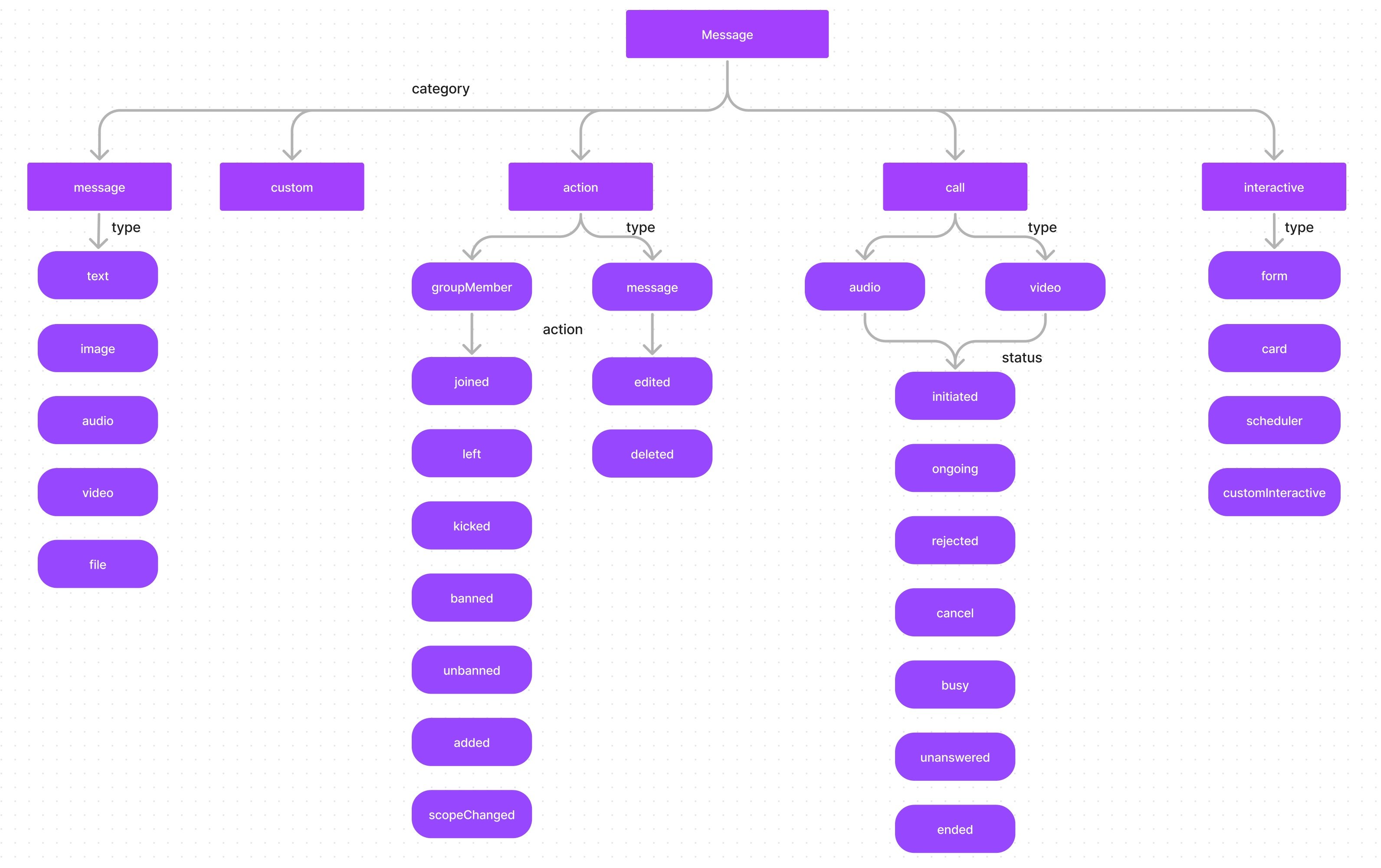
The below diagram helps you better understand the various message categories and types that a CometChat message can belong to.
 ## Categories Overview
| Category | Types | Description |
| --------- | ----------------------------------------- | ------------------------------------------------------------------ |
| `message` | `text`, `image`, `video`, `audio`, `file` | Standard user messages |
| `custom` | Developer-defined | Custom data (location, polls, etc.) |
| `action` | `groupMember`, `message` | System-generated events |
| `call` | `audio`, `video` | Call-related messages |
| `card` | `text` | Rich [card messages](/sdk/javascript/card-messages) (receive-only) |
## Checking Message Category and Type
Use `getCategory()` and `getType()` to determine how to handle a received message:
```typescript theme={null}
const category: string = message.getCategory();
const type: string = message.getType();
switch (category) {
case CometChat.CATEGORY_MESSAGE:
if (type === CometChat.MESSAGE_TYPE.TEXT) {
const textMsg = message as CometChat.TextMessage;
console.log("Text:", textMsg.getText());
} else if (type === CometChat.MESSAGE_TYPE.IMAGE) {
const mediaMsg = message as CometChat.MediaMessage;
console.log("Image URL:", mediaMsg.getData().url);
}
break;
case CometChat.CATEGORY_CUSTOM:
const customMsg = message as CometChat.CustomMessage;
console.log("Custom type:", type, "data:", customMsg.getData());
break;
case CometChat.CATEGORY_ACTION:
console.log("Action:", message.getAction());
break;
case CometChat.CATEGORY_CALL:
console.log("Call status:", message.getStatus());
break;
}
```
```javascript theme={null}
const category = message.getCategory();
const type = message.getType();
switch (category) {
case CometChat.CATEGORY_MESSAGE:
if (type === CometChat.MESSAGE_TYPE.TEXT) {
const textMsg = message as CometChat.TextMessage;
console.log("Text:", textMsg.getText());
} else if (type === CometChat.MESSAGE_TYPE.IMAGE) {
const mediaMsg = message as CometChat.MediaMessage;
console.log("Image URL:", mediaMsg.getData().url);
}
break;
case CometChat.CATEGORY_CUSTOM:
const customMsg = message as CometChat.CustomMessage;
console.log("Custom type:", type, "data:", customMsg.getData());
break;
case CometChat.CATEGORY_ACTION:
console.log("Action:", message.getAction());
break;
case CometChat.CATEGORY_CALL:
console.log("Call status:", message.getStatus());
break;
}
```
## Standard Messages (`message` Category)
Messages with category `message` are standard user-sent messages:
| Type | Description |
| ------- | ------------------ |
| `text` | Plain text message |
| `image` | Image attachment |
| `video` | Video attachment |
| `audio` | Audio attachment |
| `file` | File attachment |
## Custom Messages (`custom` Category)
Custom messages allow you to send data that doesn't fit the default categories. You define your own type to identify the message (e.g., `location`, `poll`, `sticker`).
```javascript theme={null}
// Example: Sending a location as a custom message
const customMessage = new CometChat.CustomMessage(
receiverID,
CometChat.RECEIVER_TYPE.USER,
"location",
{ latitude: 37.7749, longitude: -122.4194 }
);
```
See [Send Message → Custom Messages](/sdk/javascript/send-message#custom-message) for details.
## Action Messages (`action` Category)
Action messages are system-generated events. They have a `type` and an `action` property:
**Type: `groupMember`** — Actions on group members:
* `joined` — Member joined the group
* `left` — Member left the group
* `kicked` — Member was kicked
* `banned` — Member was banned
* `unbanned` — Member was unbanned
* `added` — Member was added
* `scopeChanged` — Member's scope was changed
**Type: `message`** — Actions on messages:
* `edited` — Message was edited
* `deleted` — Message was deleted
## Call Messages (`call` Category)
Call messages track call events with types `audio` or `video`. The `status` property indicates the call state:
| Status | Description |
| ------------ | ----------------------------- |
| `initiated` | Call started |
| `ongoing` | Call accepted and in progress |
| `canceled` | Caller canceled |
| `rejected` | Receiver rejected |
| `unanswered` | No answer |
| `busy` | Receiver on another call |
| `ended` | Call completed |
See [Default Calling](/sdk/javascript/default-call) or [Direct Calling](/sdk/javascript/direct-call) for implementation.
***
## Next Steps
Send text, media, and custom messages
Listen for incoming messages in real time
Advanced message filtering with RequestBuilder
## Categories Overview
| Category | Types | Description |
| --------- | ----------------------------------------- | ------------------------------------------------------------------ |
| `message` | `text`, `image`, `video`, `audio`, `file` | Standard user messages |
| `custom` | Developer-defined | Custom data (location, polls, etc.) |
| `action` | `groupMember`, `message` | System-generated events |
| `call` | `audio`, `video` | Call-related messages |
| `card` | `text` | Rich [card messages](/sdk/javascript/card-messages) (receive-only) |
## Checking Message Category and Type
Use `getCategory()` and `getType()` to determine how to handle a received message:
```typescript theme={null}
const category: string = message.getCategory();
const type: string = message.getType();
switch (category) {
case CometChat.CATEGORY_MESSAGE:
if (type === CometChat.MESSAGE_TYPE.TEXT) {
const textMsg = message as CometChat.TextMessage;
console.log("Text:", textMsg.getText());
} else if (type === CometChat.MESSAGE_TYPE.IMAGE) {
const mediaMsg = message as CometChat.MediaMessage;
console.log("Image URL:", mediaMsg.getData().url);
}
break;
case CometChat.CATEGORY_CUSTOM:
const customMsg = message as CometChat.CustomMessage;
console.log("Custom type:", type, "data:", customMsg.getData());
break;
case CometChat.CATEGORY_ACTION:
console.log("Action:", message.getAction());
break;
case CometChat.CATEGORY_CALL:
console.log("Call status:", message.getStatus());
break;
}
```
```javascript theme={null}
const category = message.getCategory();
const type = message.getType();
switch (category) {
case CometChat.CATEGORY_MESSAGE:
if (type === CometChat.MESSAGE_TYPE.TEXT) {
const textMsg = message as CometChat.TextMessage;
console.log("Text:", textMsg.getText());
} else if (type === CometChat.MESSAGE_TYPE.IMAGE) {
const mediaMsg = message as CometChat.MediaMessage;
console.log("Image URL:", mediaMsg.getData().url);
}
break;
case CometChat.CATEGORY_CUSTOM:
const customMsg = message as CometChat.CustomMessage;
console.log("Custom type:", type, "data:", customMsg.getData());
break;
case CometChat.CATEGORY_ACTION:
console.log("Action:", message.getAction());
break;
case CometChat.CATEGORY_CALL:
console.log("Call status:", message.getStatus());
break;
}
```
## Standard Messages (`message` Category)
Messages with category `message` are standard user-sent messages:
| Type | Description |
| ------- | ------------------ |
| `text` | Plain text message |
| `image` | Image attachment |
| `video` | Video attachment |
| `audio` | Audio attachment |
| `file` | File attachment |
## Custom Messages (`custom` Category)
Custom messages allow you to send data that doesn't fit the default categories. You define your own type to identify the message (e.g., `location`, `poll`, `sticker`).
```javascript theme={null}
// Example: Sending a location as a custom message
const customMessage = new CometChat.CustomMessage(
receiverID,
CometChat.RECEIVER_TYPE.USER,
"location",
{ latitude: 37.7749, longitude: -122.4194 }
);
```
See [Send Message → Custom Messages](/sdk/javascript/send-message#custom-message) for details.
## Action Messages (`action` Category)
Action messages are system-generated events. They have a `type` and an `action` property:
**Type: `groupMember`** — Actions on group members:
* `joined` — Member joined the group
* `left` — Member left the group
* `kicked` — Member was kicked
* `banned` — Member was banned
* `unbanned` — Member was unbanned
* `added` — Member was added
* `scopeChanged` — Member's scope was changed
**Type: `message`** — Actions on messages:
* `edited` — Message was edited
* `deleted` — Message was deleted
## Call Messages (`call` Category)
Call messages track call events with types `audio` or `video`. The `status` property indicates the call state:
| Status | Description |
| ------------ | ----------------------------- |
| `initiated` | Call started |
| `ongoing` | Call accepted and in progress |
| `canceled` | Caller canceled |
| `rejected` | Receiver rejected |
| `unanswered` | No answer |
| `busy` | Receiver on another call |
| `ended` | Call completed |
See [Default Calling](/sdk/javascript/default-call) or [Direct Calling](/sdk/javascript/direct-call) for implementation.
***
## Next Steps
Send text, media, and custom messages
Listen for incoming messages in real time
Advanced message filtering with RequestBuilder